Gmail AI Inbox: Smart, Helpful, And Surprisingly Powerful
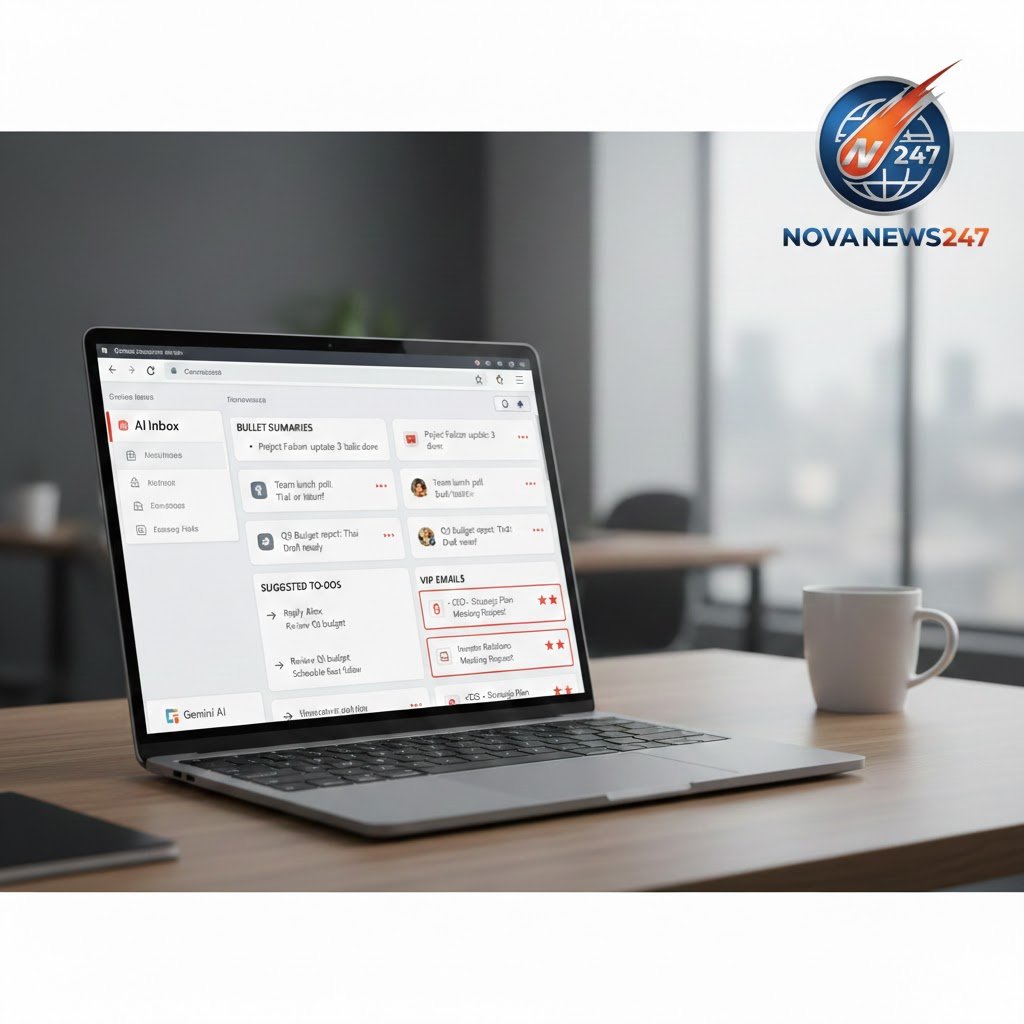
Gmail AI Inbox is Google’s new way of managing email using its Gemini AI model. Instead of showing a long list of messages, Gmail AI Inbox turns your important emails into summaries and simple to‑do items.
Google says email has changed a lot since Gmail launched in 2004 and now wants Gmail to act like a personal inbox assistant, not just a mailbox. For many users, this could make handling high email volumes faster, but it also raises questions about control and privacy.

What Is Gmail AI Inbox?
Gmail AI Inbox is a new view inside Gmail that uses Gemini AI to read, rank, and summarise your important emails. Instead of opening every message one by one, you see topics, summaries, and suggested actions at the top of the page.
Key points about Gmail AI Inbox:
- It is powered by Google’s flagship Gemini AI model.
- It focuses on summarising emails and turning them into clear to‑do items.
- It sits above the normal inbox, as a separate AI-powered view.
Google describes this as bringing Gmail into the “Gemini era”, where the inbox gives you a personalised briefing of what really matters.
How Gmail AI Inbox Works
In preview footage and Google’s own blog, AI Inbox appears as a new section above the classic inbox in the Gmail side menu. When users click it, they do not see individual emails in a long list; instead, they see grouped “topics to catch up on”.
Under each topic, Gemini shows:
- Bullet point summaries of important emails.
- The main details you need, without opening every thread.
- A quick view of what has changed or what needs action.
At the top, there is also a “suggested to‑dos” area. It includes prompts like:
- “Reschedule your upcoming dentist appointment.”
- “Reply to Coach Mike about field monitor duty.”

Next to each suggestion, Gmail AI Inbox shows a short summary of the related email, so you understand the context before clicking.
VIP Emails And Smart Prioritisation
One of the most interesting parts of Gmail AI Inbox is how it identifies “VIPs”. Gemini analyses who you email most often and uses message content to infer your relationship with them.
Using this, AI Inbox can:
- Mark some senders as VIPs, such as family, important clients, or key services.
- Push their “high-stakes” emails to the top, like bills, appointments, or travel updates.
- Help ensure you do not miss time‑sensitive or critical messages.
This kind of smart filtering could be very helpful for busy people who receive hundreds of emails every day. However, it also means users are trusting Google’s AI to decide what is important.
Gemini AI Inside Your Gmail
Gmail AI Inbox is part of a wider push by Google to put Gemini AI into more of its products. The same technology that powers AI Inbox also supports other features in Gmail and Google Workspace.
Key Gemini-powered tools inside Gmail include:
- Help Me Write: Helps draft and polish emails with AI-written suggestions.
- Suggested Replies: Offers one-click response options that try to match your writing style.
- AI Overviews: Short summaries of long email threads, so you can catch up faster.
Google has also announced that AI Overviews from Google Search are coming into Gmail, allowing users to “ask your inbox a question” using natural language. Instead of searching by keyword and scrolling for old messages, you can ask something like “What did my landlord say about the rent increase?” and see a Gemini-generated answer.
At the time of writing, the ability to ask questions to your inbox is rolling out to US subscribers of Google AI Pro and Ultra. This shows that Gmail AI Inbox is also tied to Google’s paid AI plans.
Can You Turn Gmail AI Inbox Off?
For users who do not like AI-heavy interfaces, Google has confirmed that the new AI Inbox view can be disabled. This means you can switch back to the classic inbox if you prefer a more traditional email layout.
Google also says that Gemini’s analysis of your emails will be done with “privacy protections you expect from Google”, and that your data remains under your control. According to the company, personal content used in Workspace Gemini features, including Gmail AI Inbox, is not used to train Google’s foundational models.
Convenience Or Intrusion?
Experts see both strong demand and real risks in Gmail AI Inbox. Abhinav Dhall, an associate professor at Monash University’s Department of Data Science and Artificial Intelligence, notes that users want helpful AI tools, but “AI fatigue” is also a major concern.
- Long-time and senior users may feel overwhelmed by constant changes.
- The problem is not AI itself, but how it is introduced.
- AI that is optional, transparent, and genuinely useful is more likely to be accepted.
In other words, Gmail AI Inbox may be welcomed by some users and rejected by others, depending on how much control and clarity Google provides.
How Gmail AI Inbox Changes Email Habits
Dana McKay, associate dean at RMIT’s School of Computing Technologies, says Gmail has had small AI features before, but AI Inbox adds a “third layer” on top of the existing system. For many people, that AI layer will become their main way of interacting with email.
This shift has several important effects:
- Things not surfaced in the AI layer may be ignored.
- People may start writing emails in ways that work better for AI summarisation, not just for human readers.
- Workflows will change because users usually deal with whatever appears at the top of the page first.
This could reshape not only personal email habits but also professional communication, marketing, and support.
Privacy, Control, And User Choice
The arrival of Gmail AI Inbox also revives long-running debates about privacy and data control. Even if Google promises not to use personal Workspace content to train its core models, many users feel uneasy about an AI reading and summarising all their messages.
Important questions users may ask include:
- How clearly can AI Inbox show which messages were read and how they were ranked?
- Can users easily change priorities, override AI choices, or set their own rules?
- Will Google give simple tools to customise what appears in AI Inbox?

McKay suggests that the ideal product would be more interactive and allow people to set their own priorities based on summarisation, instead of letting Google decide by default.
Who Might Benefit Most From Gmail AI Inbox?
While some users may turn AI Inbox off, others could find it extremely helpful. People who handle a huge volume of email every day stand to gain the most.
Gmail AI Inbox could be especially useful for:
- Busy professionals who receive constant updates, meeting invites, and reports.
- Freelancers juggling many clients and projects.
- Students and researchers who subscribe to multiple mailing lists.
- People managing family schedules, bills, and appointments through email.
For these groups, having Gemini pick out the most urgent items and summarise long threads could save real time and reduce stress.
The Future Of Gmail With AI
Gmail AI Inbox is part of a bigger trend: AI moving into everyday tools like email, search, and office apps. Google’s strategy connects Gemini across Gmail, Google Search, and Workspace, creating one AI layer that users interact with in many places.
Looking ahead, users can expect:
- Deeper integration between Gmail, Calendar, Docs, and Meet using Gemini.
- More natural-language features, where you ask the system questions instead of clicking and searching.
- New privacy settings and controls as regulators and users push for transparency.
How people react will depend on whether Gmail AI Inbox feels helpful and respectful, or intrusive and controlling.