What is ChatGPT Wrapped?
ChatGPT Wrapped is a year-in-review feature that summarizes how you used the chatbot over the past twelve months. Instead of showing long logs or complex charts, it gives a clear, human-style recap of your activity. You see how often you used the tool, what you mainly used it for, and which topics took most of your attention during the year.
This recap feels familiar because it follows the same idea as Spotify Wrapped or YouTube Recap, but here the focus is on your AI conversations and not on songs or videos. The result is a simple story about your digital habits with the assistant, written in normal language that anyone can understand.
How it finds patterns in your chats
To build this yearly view, the system scans your past conversations and looks for patterns in the questions you ask. It checks which topics appear again and again, such as study help, coding, content writing, planning, or personal advice. It does not need to read every line one by one; instead, it groups similar prompts and replies so it can see the bigger picture.
Because of this grouping, the recap can stay accurate even if you exchanged thousands of messages in a year. You get a high-level summary of themes and habits, not a heavy technical report. This is what makes the feature useful for normal users who just want a quick overview of how they used AI.
How your AI story is presented
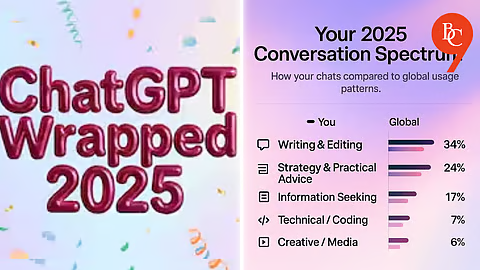
The yearly summary does more than list numbers; it turns your usage into a mini story. The recap often includes simple statistics like total messages, the number of active days, and which months were the busiest. Along with that, it highlights your main categories, such as learning, productivity, creativity or fun.
The system may also assign you a playful role or “archetype” based on your behavior, for example creator, planner, problem solver or explorer. This label is not a strict category, but it gives a fun way to think about how you used the assistant most of the time. The combination of numbers, themes and roles makes the recap feel like a short story about your year with AI, not just dry data.
Eras and rabbit holes in your usage
Another idea many guides mention is “eras” and “rabbit holes” in your yearly summary. An era is a phase when you were mostly focused on a single area, like exam preparation, learning a new programming language, or planning a business. A rabbit hole is a deep dive into one topic where you keep asking follow-up questions and refining the same idea for many messages.
By showing these phases and deep dives, the recap reminds you how your interests changed across the year. You may see that you started with learning tasks, then moved into career planning, and later spent time on creative work like scripts, posts or story ideas. This kind of time-based view makes your digital journey with AI much easier to remember.
Privacy, control and settings
Because the summary uses your past conversations, privacy and control are very important. To get a personal recap, you usually need to sign in and allow the system to use your stored chats or memory. If you keep history access turned off, it cannot build a real year-in-review and will only show generic examples.
Most how‑to guides clearly mention that you should check your settings before running this type of analysis. Users are advised to understand what is being read, how it is used, and which parts of the recap they are comfortable sharing in public. This balance between insight and privacy is a key part of any modern digital feature based on personal data.
Steps to generate your own yearly recap
Tutorials online show a simple process to create a year-in-review summary using the assistant. First, you log into your account and make sure conversation history or memory is enabled so the system has data to analyze. Next, you paste a detailed prompt that asks the model to act like a data analyst and storyteller, to scan your previous chats and build a structured recap.
You can ask it to organize the results into sections like “Top Topics,” “Biggest Deep Dives,” “Most Productive Use Cases” and “Most Creative Requests.” After it generates the first version, you can refine the language, shorten long parts, or ask for more detail where needed. Many people also ask for a version tailored for blogs, newsletters, or social media posts.
Choosing the right tone for your recap
One big advantage of this feature is that you can pick the tone that fits your needs. If you want something fun to share with friends, you can request a casual style with jokes and short, punchy lines. If you plan to use it for serious reflection or work, you can ask for a clear, professional tone that focuses on learning and productivity.
Because the assistant can change its writing style, the same data can be reused in many formats: blog articles, scripts, posts, or even slide notes. This makes the yearly recap not just a static report but a flexible starting point for different types of content.
Turning your recap into visual content
There is also a strong visual and social side to this trend. Many users take the main lines and numbers from their recap and move them into tools like Canva or video editors to create images, reels or short clips. They highlight key stats, themes and their personal role using bold colors, icons and simple layouts that are easy to read on mobile.
Some people blur personal details or skip sensitive parts before posting, so they can enjoy the fun side without revealing private information. This habit of turning personal data into shareable visuals is now common across music, streaming, and AI services.
Using your yearly data to improve
Beyond entertainment, this type of recap can help you improve how you use AI. If you see that most of your questions were very basic or repeated, you might learn to write clearer, more detailed prompts in the future. If the summary shows that you mainly used the tool for studying but not for planning, automation or business tasks, you may discover new areas where AI can support your goals.
In this way, a year-in-review summary turns your old chats into a guide for next year. You can decide what to change, what to keep, and which new skills you want to build with the help of AI.
Link with AI learning and training
Education platforms and training providers also see value in these recaps. Articles from the blockchain and AI community note that, once you understand your own usage patterns, you can pick better courses or skill paths. If your year was full of questions about blockchain, Web3 or smart contracts, you might enroll in a focused program to deepen that knowledge.
This link between personal data, reflection and structured learning is becoming stronger as more people use AI daily. The yearly summary becomes a bridge between everyday experimentation and long-term professional growth.
What this trend says about the future
The rise of year-in-review features in AI shows how integrated these tools have become in daily life. A service can only give a meaningful recap if users come back again and again throughout the year for real tasks. The popularity of these summaries suggests that people now see AI not just as a tool but as a regular part of their digital identity.
As more products add similar options, users will have more ways to understand and manage their digital habits. For creators and bloggers, this is also a rich topic, because it connects technology, behaviour, privacy and storytelling in one simple, easy-to-read package.