
Chrome extensions steal ChatGPT data: why this is a big warning
Chrome extensions steal ChatGPT data in a new malware campaign that has already put more than 900,000 users at risk. Security experts found that two popular extensions were secretly copying conversations from ChatGPT and DeepSeek and sending them to unknown servers every 30 minutes.
On the surface, these tools looked like normal AI helpers that add a sidebar and let you chat with different AI models on any website. In reality, they acted like spyware. These Chrome extensions steal ChatGPT data, DeepSeek chats, and even your browsing history, all while you are just working or studying online.
Which Chrome extensions steal ChatGPT data?
Researchers discovered that two fake tools were made to look like a legitimate AITOPIA sidebar extension. These are the main extensions that helped Chrome extensions steal ChatGPT data:
- Chat GPT for Chrome with GPT-5, Claude Sonnet & DeepSeek AI
- AI Sidebar with Deepseek, ChatGPT, Claude, and more
Together, these two had over 900,000 installs, and one of them even had a Google “Featured” badge in the Chrome Web Store. That badge usually makes users trust the extension, but here it hid the fact that these Chrome extensions steal ChatGPT data and DeepSeek conversations in the background.
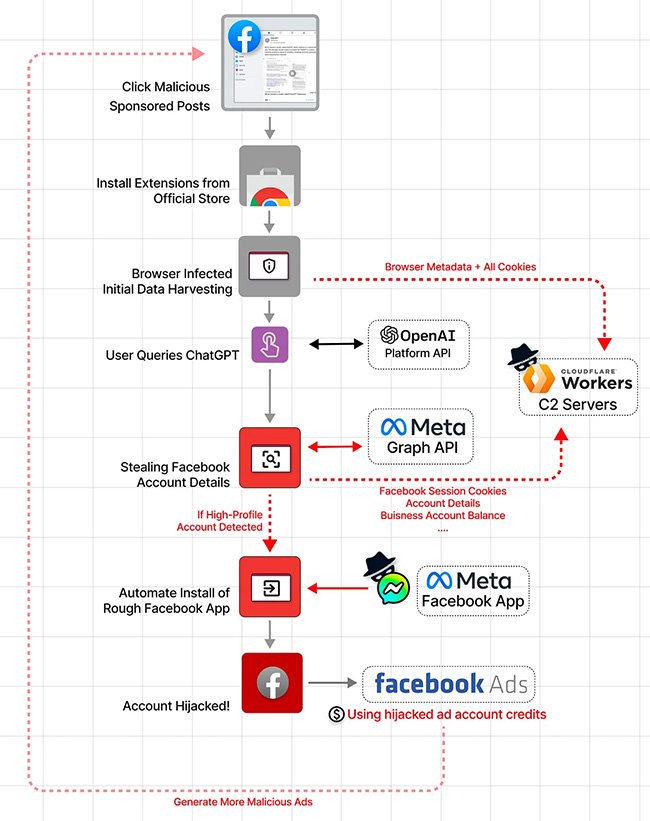
Once installed, the malware created a unique ID for each user. It watched open tabs, waited until you opened ChatGPT or DeepSeek, and then scraped your full chat directly from the page. It also collected all active URLs from your browser and uploaded everything to attacker servers every half hour. In short, these Chrome extensions steal ChatGPT data in a silent, automated, and large‑scale way.

Why stolen AI chats are so dangerous
When Chrome extensions steal ChatGPT data, they are not just taking fun prompts or simple questions. Many people use AI chats for real work. They paste company code, legal drafts, business plans, or customer details straight into ChatGPT and DeepSeek.
Stolen AI chats can include:
- Proprietary source code and product designs
- Internal strategy documents and meeting notes
- Personal information like names, emails, phone numbers
- Confidential business data about clients or deals
Experts warn that this stolen data can be used for corporate espionage, identity theft, and very targeted phishing attacks. Attackers can study conversations, understand how a company works, and then craft fake emails that look extremely real. Because these Chrome extensions steal ChatGPT data together with browsing history, criminals can see which services you use and where to attack next.
How a “Featured” badge helped Chrome extensions steal ChatGPT data
A very worrying part of this story is that one of the malicious tools that helped Chrome extensions steal ChatGPT data had a “Featured” badge from Google. Many people believe that a Featured badge means the extension is extra safe and has been fully checked.
In this case, attackers copied the look and behaviour of the real AITOPIA extension. They even mentioned AITOPIA in their privacy text to look more legitimate. For a normal user, it was almost impossible to see that these Chrome extensions steal ChatGPT data and DeepSeek chats.
This is also not the first time something like this has happened. In an earlier case, a different Chrome extension with millions of users and a 4.7‑star rating was caught harvesting AI conversations and selling them as data. Again, it looked useful on the outside but proved that even trusted‑looking tools can be part of a spying network. The pattern is clear: a badge and high rating do not guarantee that Chrome extensions do not steal ChatGPT data.
How to protect yourself when Chrome extensions steal ChatGPT data
If you think Chrome extensions steal ChatGPT data from your browser, there are a few simple but important steps you should take right now.
First, remove any suspicious AI extensions. Uninstall “Chat GPT for Chrome with GPT-5, Claude Sonnet & DeepSeek AI” and “AI Sidebar with Deepseek, ChatGPT, Claude, and more” if you ever installed them. Then open your extension list and remove any tool you do not remember installing or no longer need. Keeping your browser clean reduces the chance that Chrome extensions steal ChatGPT data in the future.
Second, change any passwords or API keys that you might have pasted into AI chats. If you shared company secrets, talk to your IT or security team so they can review logs and update keys. Treat this case as you would treat any other data breach, because when Chrome extensions steal ChatGPT data, they may also copy tokens and login sessions.
Third, change how you use AI tools day to day. Avoid pasting full databases, raw customer lists, or secret internal documents into public chatbots. Use test data or remove personal details before sharing text. Even if no Chrome extensions steal ChatGPT data on your device today, this safer habit will protect you from future threats.
What companies should do if Chrome extensions steal ChatGPT data
For companies and teams, this incident is a serious warning about how browser tools can leak sensitive information. Employees might install AI helper extensions on work laptops without asking IT, and then use them daily with ChatGPT and DeepSeek. If Chrome extensions steal ChatGPT data in that environment, they may also leak intellectual property and customer data.
Organizations should run an audit of all Chrome extensions used on corporate devices and remove any risky ones. They should create a clear policy for AI use: which tools are allowed, what kind of data can be shared, and when it is forbidden to paste sensitive text into a chatbot. Training is also critical. Staff need to understand that some Chrome extensions steal ChatGPT data even while promising privacy and productivity.

Final thoughts: stay alert when Chrome extensions steal ChatGPT data
The story of how Chrome extensions steal ChatGPT data shows that even useful‑looking tools can hide spyware. Two fake AITOPIA‑style extensions quietly collected AI chats and browsing history from more than 900,000 users, and one of them even carried a Featured badge.
Going forward, users need to be more careful about which extensions they install, and companies must treat AI chats as sensitive data that must be protected. By cleaning up your browser, changing risky habits, and watching out for signs that Chrome extensions steal ChatGPT data, you can keep your conversations, code, and private information much safer.